Detection Coverage Calculator
Calculator Overview
The Detection Coverage Calculator automates the evaluation of detection coverage by analyzing what detection logic actually observes, looking deeper than just what it is mapped to.
The DCC evaluates detection content across two complementary dimensions: Detection Quality, measured through robustness and precision, and Implementation Coverage, which measures how much of the known behavioral implementation space for a mapped ATT&CK technique is detected. The result provides a more evidence-based view of coverage: what behavior is detected, how durable and precise the underlying detection signals are, and where meaningful gaps remain.
How It Works
The DCC brings together four components to connect ATT&CK techniques to observable behavior and detection logic.
Implementation Catalog
The Implementation Catalog describes behaviorally distinct ways of executing ATT&CK techniques. Built from ATT&CK procedure examples and Atomic Red Team tests, the catalog normalizes specific examples into reusable implementation paths and identifies the system interactions required to perform them. The DCC uses the catalog as the behavioral baseline against which Implementation Coverage is measured.
Sensor Mappings
Sensor-Field Mappings connect system activity to the telemetry available to observe it. The DCC extends previous sensor-mapping work with field-level information for supported telemetry sources, allowing it to evaluate the specific fields used by detection logic rather than treating the presence of an event or data source as sufficient evidence of detection.
This project produced a structured dataset of Windows Event Log reference fields indexed by Windows Event ID. The purpose of the dataset was to create a consistent set of XML fields found within common and advanced Windows Security auditing events, and to provide a foundation for later analytic work. The work was limited to documenting the published XML structure and normalizing to appropriate fields. The derived data set does not directly interpret the meaning of individual fields or create specific detection mappings. The example below demonstrates how a Windows Event Log entry is mapped.
Example Usage:
<System>
   <Provider Name="Microsoft-Windows-Security-Auditing"/>
   <EventID>4624</EventID>
   <Version>2</Version>
   ...
</System>

<EventData>
   <Data Name="SubjectUserSid"/>
   <Data Name="SubjectUserName"/>
   <Data Name="SubjectDomainName"/>
   <Data Name="TargetUserSid"/>
   <Data Name="TargetUserName"/>
   <Data Name="TargetDomainName"/>
   <Data Name="LogonType"/>
   <Data Name="IpAddress"/>
   <Data Name="IpPort"/>
</EventData>
System Fields
XML field |
Reference field |
|---|---|
Provider.Name |
System.Provider.Name |
EventID |
System.EventID |
Version |
System.Version |
TimeCreated.SystemTime |
System.TimeCreated.SystemTime |
Computer |
System.Computer |
Event Data Fields
XML field |
Reference field |
|---|---|
SubjectUserSid |
EventData.SubjectUserSid |
SubjectUserName |
EventData.SubjectUserName |
SubjectDomainName |
EventData.SubjectDomainName |
TargetUserSid |
EventData.TargetUserSid |
TargetUserName |
EventData.TargetUserName |
TargetDomainName |
EventData.TargetDomainName |
LogonType |
EventData.LogonType |
IpAddress |
EventData.IpAddress |
IpPort |
EventData.IpPort |
Analytic Ingestion
The Ingestion step in the pipeline automates rule processing for all of your detection logic. The script recursively steps through a rule directory and its subdirectories and pulls the values from each rule that the calculator needs to determine a coverage score.
There is no need to clean up the directory. It steps through level by level and only loads in YAML files. The process then uses a combination of regular expressions and context clues to extract the information.
Extracted Fields:
Field Extracted |
Description |
|---|---|
rule_title |
The title of the SIGMA rule |
rule_logsource_product |
The product that the rule was created to defend |
rule_logsource_category |
The type of log that the rule is from
|
rule_tags |
Any tags that the rule is with. Mainly ATT&CK Techniques and Tactics |
detection_fields |
The fields the rule uses to detect the activity |
detection_filters |
Any filters the rule may use |
detection_condition |
What causes the rule to trigger a positive detection |
Example
Take the following rule, for example.
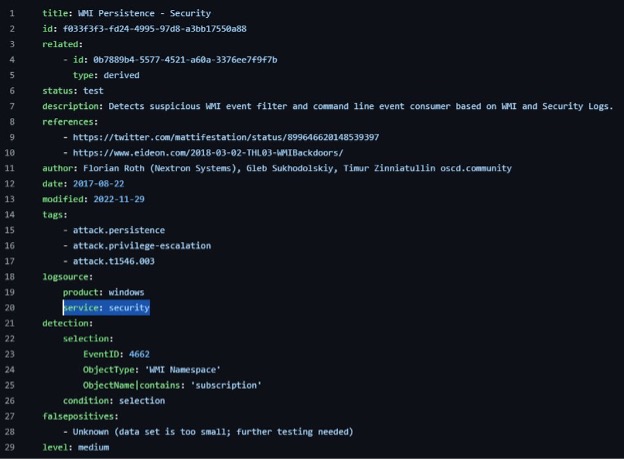
It is a rule to detect WMI Persistance from the Windows Security logs.
The script, analyzes the rule, and creates the following JSON.
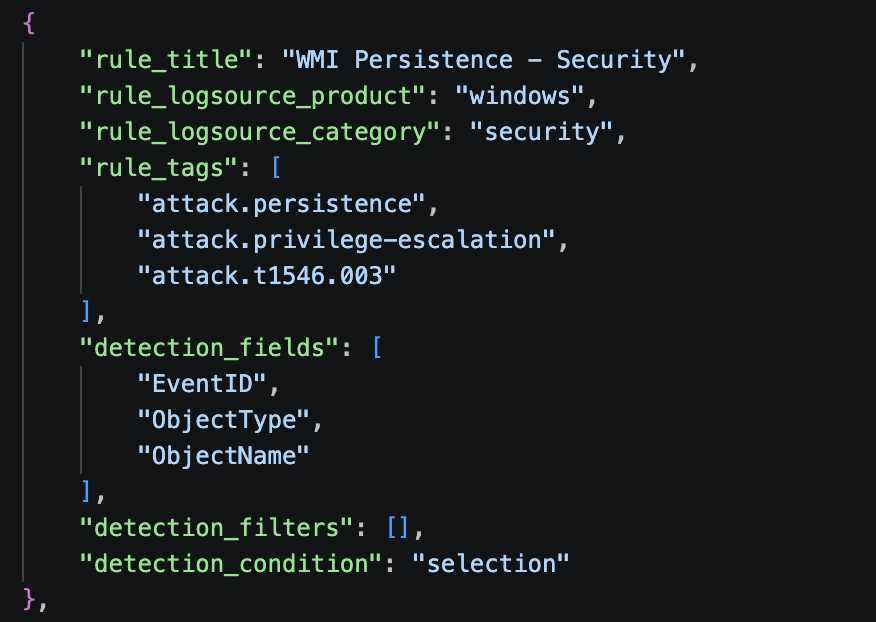
With this formatted output, the next step in the pipeline can now take place.
Scoring Dictionary
The Scoring Dictionary provides standardized robustness and precision values for supported telemetry sources and fields. The DCC uses these values to automatically evaluate the Detection Quality of the signals used by an analytic.

Using the Calculator
Supported Detection Formats
The current DCC supports Sigma specification-formatted YAML detection content and can process Sigma files stored locally or in a GitHub repository. The ingestion framework is designed to support additional detection formats as the project evolves.
Running an Assessment
Users provide detection content for analysis. The DCC parses each analytic, resolves its ATT&CK mapping and telemetry dependencies, evaluates its detection logic, and compares that evidence against the Implementation Catalog and Scoring Dictionary.
A valid ATT&CK mapping is required because the DCC evaluates the analytic against implementations of its stated technique; it does not infer missing technique mappings. Telemetry fields must likewise be recognizable within the supported Sensor Mappings for automated Detection Quality scoring.
Interpreting Results
DCC results should be used to identify opportunities for detection engineering—not simply to maximize a score.
Results can highlight:
behavioral implementations that lack detection coverage;
detections that depend on fragile or low-precision signals;
ATT&CK mappings that may not be supported by the detection logic;
telemetry limitations preventing stronger detection; and
areas where additional engineering investment could meaningfully improve coverage.
A low score does not necessarily mean an analytic is ineffective for its intended purpose. A narrowly targeted analytic may be valuable while providing limited evidence of broader technique coverage.
Generating Reports
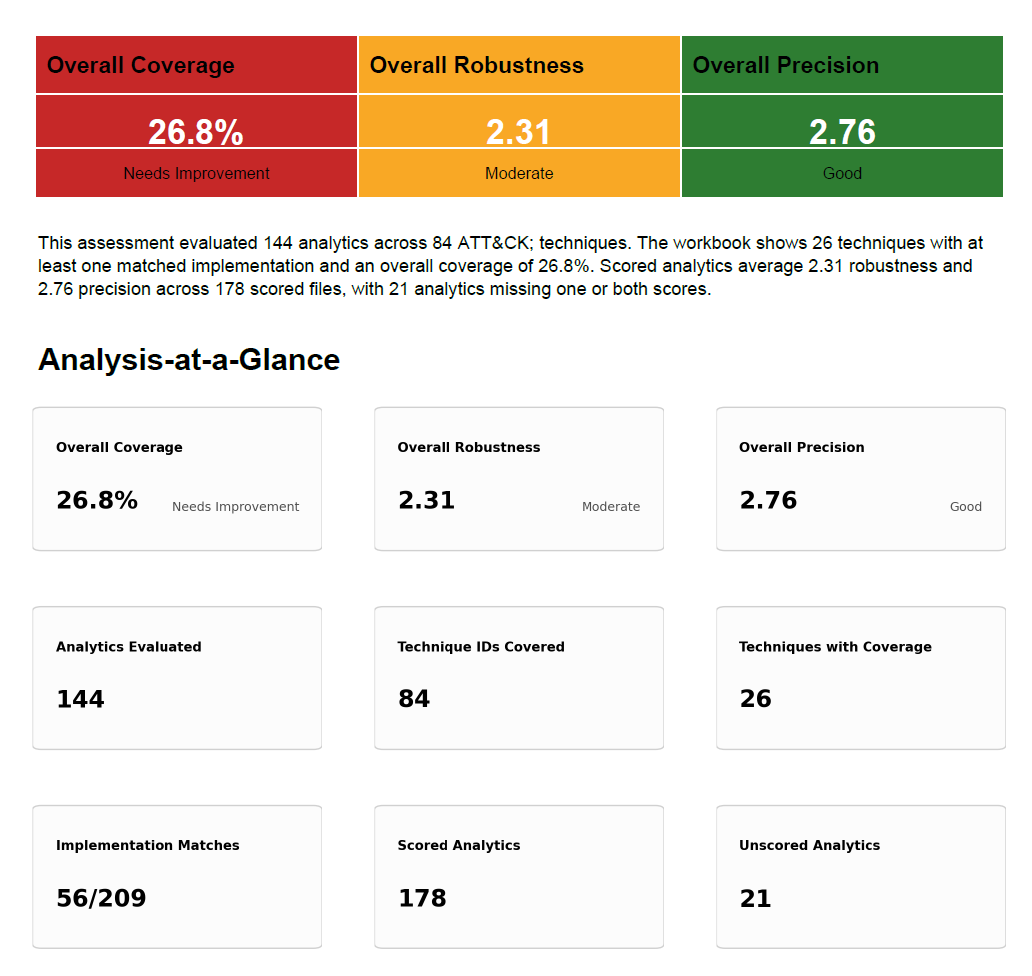
The DCC produces detailed spreadsheet output containing analytic- and technique-level results and supports generation of an executive-oriented coverage report. These outputs provide both the underlying assessment data and a higher-level view of Detection Quality, Implementation Coverage, and identified gaps.
We have also developed a ChatGPT skill that takes the spreadsheet as an input to generate an executive-level report highlighting major findings and giving more of an overview of the results to assist in decision-making. Both are available in our STP Github repository!
GitHub / Download
View the Detection Coverage Calculator on GitHub
The project repository contains the DCC, supporting data, and documentation needed to run coverage assessments.